Inventor 2026.1 Makes Assigning Mate Constraints a Breeze

February 9, 2026 Jennifer MacMillan

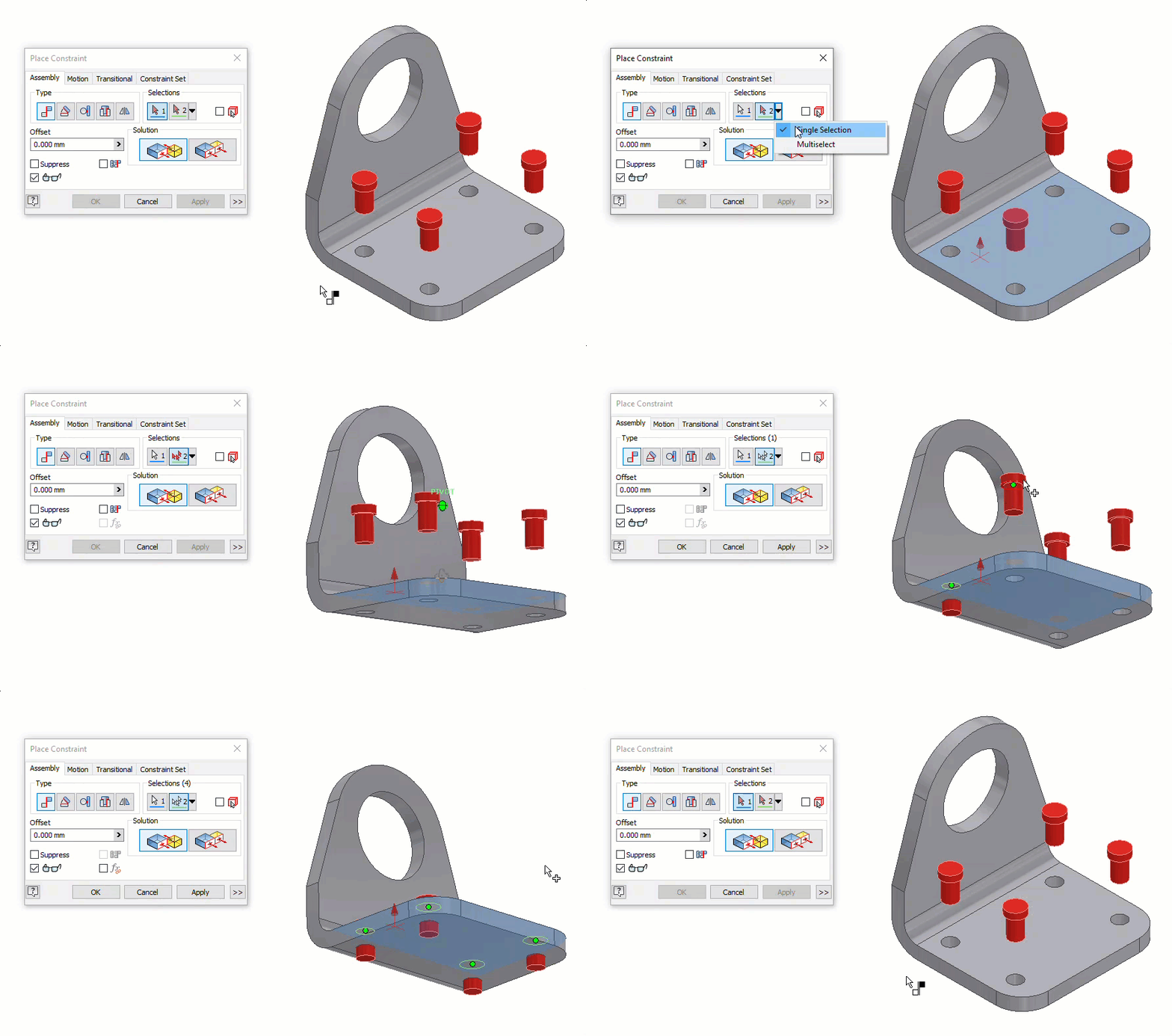
The release of Autodesk Inventor 2026.1 brings a subtle but handy change to how you can assign mate constraints. A new pull-down menu has been added for the second selection option that allows you to toggle between single or multiple selections. 

A screenshot of a computer program

AI-generated content may be incorrect. 

With the Multiselect option selected, you are now able to select multiple references from different components to mate with the first selection, as shown below.  
A computer screen shot of a deviceAI-generated content may be incorrect. 

This new option will certainly help make assigning constraints more efficient when assembling multiple components to the same face. I hope you find this feature helpful! 

About the Author

Jennifer MacMillan

Manager – Learning Content Development<br><br>Trained in Instructional Design, Jennifer uses her skills to develop instructor-led and web-based training products as well as knowledge profiling tools. Jennifer has achieved the Autodesk Certified Professional certification for Inventor and is also recognized as an Autodesk Certified Instructor (ACI). She enjoys teaching the training courses that she authors and is also very skilled in providing technical support to end-users. Jennifer holds a Bachelor of Engineering Degree as well as a Bachelor of Science in Mathematics from Dalhousie University.

Follow on Linkedin More Content by Jennifer MacMillan
Previous Article
 Creating Associative Part Files with AutoCAD DWG Files in Inventor
Creating Associative Part Files with AutoCAD DWG Files in Inventor

Importing AutoCAD DWG files as underlays in Inventor is a robust way to bridge between 2D and 3D workflows.

Next Article
The Art of Instructional Writing: The Approach

Learn how our instructional writing services support the development of clear, consistent, and practical le...

×

Sign up for email updates

First Name
Last Name
Country
Thank you!
Error - something went wrong!